

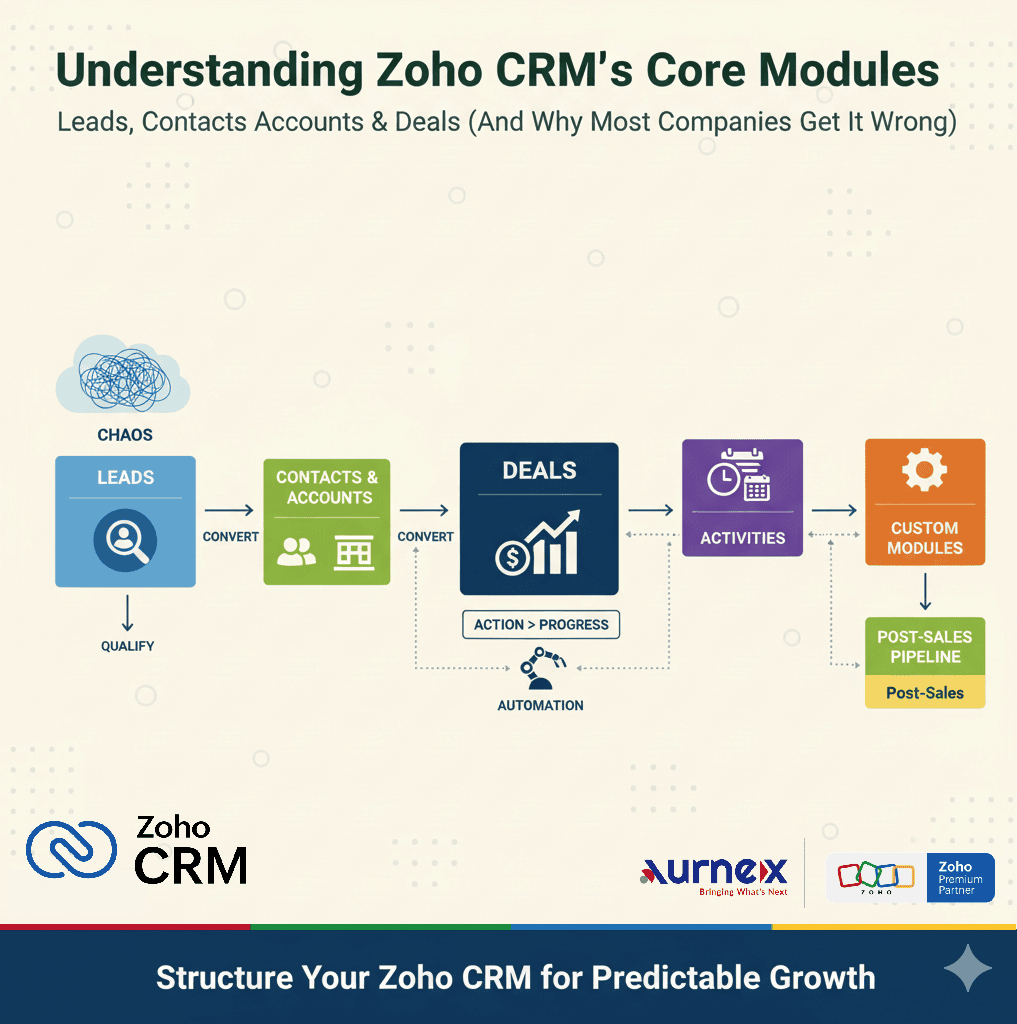
The decision at a glance
Scan the points below, then read the sections relevant to your situation.
Use Leads for qualification
- The enquiry is not yet qualified.
- Fit, intent, authority or timing still needs validation.
- Early enquiries should remain separate from active opportunities.
Convert with intention
- Create or associate the Contact for the person.
- Create or associate an Account when a company relationship applies.
- Create a Deal only when a genuine opportunity needs pipeline tracking.
Define Accounts for B2B and B2C
- B2B Accounts normally represent organisations.
- B2C teams must agree whether individuals need Accounts at all.
- Duplicate rules and naming conventions should be set before migration.
Avoid
- Turning every enquiry into a Deal.
- Using stages without a completed-action definition.
- Assuming mobile activity logging works identically on every platform.
- Leads hold people or organisations that still need qualification.
- Contacts and Accounts represent known relationships after qualification.
- Deals represent genuine revenue opportunities that need stage, value and forecast tracking.
01Leads: keep unqualified enquiries separate
A Lead is useful when the team still needs to confirm fit, intent, authority, need or timing. Website forms, calls, referrals, campaigns and event contacts can enter here without immediately inflating the opportunity pipeline.
- 01Record the source and assign a clear owner.
- 02Define the minimum information required for qualification.
- 03Schedule the next action instead of relying on memory.
- 04Close or nurture enquiries that are not ready to progress.
02Convert only after the qualification rule is met
Lead conversion should mark a real change in the relationship. The organisation must define that checkpoint—for example, a confirmed requirement and an agreed next sales step.
In Zoho CRM, conversion creates or associates a Contact. It can create or associate an Account when the company relationship applies. Creating a Deal is optional and should be selected only when a qualified opportunity needs pipeline tracking.
- 01Contact: the person with whom the organisation communicates.
- 02Account: the company or organisation connected to that person, where relevant.
- 03Deal: the specific commercial opportunity, its value, expected close date and stage.
03Accounts need a deliberate B2B or B2C rule
In B2B sales, an Account commonly represents the customer organisation and can connect several Contacts and Deals. This gives the team one place to understand the wider relationship.
In B2C sales, the meaning is less automatic. A real-estate buyer, patient, student or retail customer may be an individual rather than a company. Decide whether the process should use Contacts without a conventional company Account, person-style Account conventions, or another supported design. Test reporting and integrations before standardising the choice.
04Deals: track an opportunity through observable stages
A Deal should represent a qualified revenue opportunity. Its stages should describe observable progress so that two users interpret the pipeline in the same way.
- 01Discovery completed.
- 02Requirements confirmed.
- 03Proposal shared.
- 04Proposal reviewed.
- 05Commercial negotiation.
- 06Decision pending.
- 07Closed won or closed lost.
Negotiation is not inherently a bad stage. It becomes unreliable when the team has not defined what entered negotiation, who owns the next action and what allows the Deal to move forward.
05Activities make the record operational
Calls, meetings and tasks connect the customer record with the work the team must complete. Each activity should have an owner, due date, outcome and next step where appropriate.
Zoho CRM mobile call logging depends on the device platform and enabled application settings. For example, iOS has restrictions for incoming-call logging, while outgoing-call behaviour can follow the selected call-logging configuration. Confirm the supported behaviour on the devices the team actually uses.
06Continue the workflow after a Deal closes
Closed Won may hand work to onboarding, projects, installation, finance, service or renewal teams. That handoff does not always belong in a second Deal pipeline. Choose the destination module or connected application from the records, ownership and reporting required after sale.
- 01Define the event that starts delivery.
- 02Specify which sales data must be carried forward.
- 03Assign the receiving owner and first task.
- 04Keep operational status separate from sales forecasting.
07Add automation after the process is stable
Automation can assign records, create tasks, send approved notifications and flag inactivity. It should support a defined responsibility—not compensate for an unclear process.
- 01Automate repeatable steps with a clear trigger and owner.
- 02Keep exception handling visible to users and managers.
- 03Review failure paths, duplicate handling and notification volume.
- 04Measure whether the automation improves response and data quality.
08Two illustrative structures
B2B manufacturer
Keep raw enquiries in Leads. Convert after product fit and requirement are understood. Associate the Contact with the customer Account and create a Deal for the qualified opportunity. Hand the won opportunity to the agreed delivery workflow without mixing delivery stages into the sales forecast.
B2C real-estate team
Keep early portal and campaign enquiries in Leads. Convert site-visit-ready buyers into Contacts and qualified Deals. Define how an individual buyer is represented before deciding whether Accounts are required. Use activities for visits, documents and follow-up.
09Review the structure before adding more features
- 01What exact condition qualifies a Lead?
- 02When should a Deal be created—and when should it not?
- 03What does an Account represent in this business model?
- 04Can every stage be explained as a completed action or clear status?
- 05Where does work go after Closed Won?
- 06Which automations have an owner, exception path and measurable purpose?
A useful CRM structure separates qualification, relationships, opportunities and activities while keeping the handoffs understandable to the people who use it.
VerificationSources and product references+
Product statements were checked against these official Zoho pages. Availability can vary by region, edition and configuration.
Is your CRM structure helping the sales team—or creating noise?
- ?Are enquiries becoming Deals before they are genuinely qualified?
- ?Do salespeople agree on the meaning of every pipeline stage?
- ?Are duplicate Contacts or Accounts affecting reporting?
- ?Should the current module structure be reviewed before more automation is added?
If any of these questions reflect your current setup, bring the existing modules, stages and reports to an Aurnex consultation. We can help map the structure before configuration changes are made.
Book a consultation