


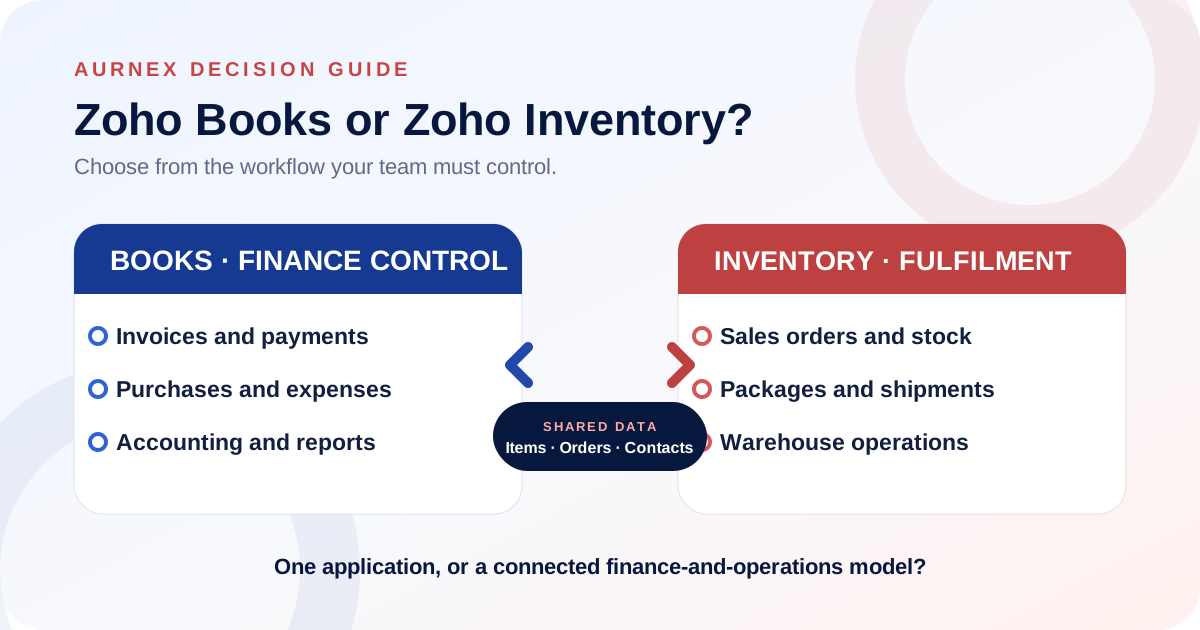
The decision at a glance
Scan the points below, then read the sections relevant to your situation.
Zoho Books may be enough when
- Accounting is the primary requirement.
- Stock tracking is straightforward.
- No separate packing or shipping workflow is needed.
Consider Zoho Inventory when
- Warehouse or fulfilment teams need operational control.
- Orders move through packing, shipment and delivery stages.
- Stock exceptions need more detailed handling.
Consider both when
- Finance and fulfilment have different owners.
- Shared items, contacts and transactions must remain connected.
- Operational events must flow into financial records.
Do not decide only from
- The number of available features.
- The company size or employee count.
- An assumption that every edition includes the same capabilities.
- Zoho Books and Zoho Inventory overlap around items and sales transactions, but they solve different operational problems.
- Zoho Books centres the financial record.
- Zoho Inventory adds deeper control over stock, order fulfilment, packages and shipments.
The right decision is therefore not “Which product has more features?” It is “Where does the work begin, who owns each step, and what must remain accurate when an order moves from sale to delivery and accounting?”
01The short answer
Choose Zoho Books when the primary requirement is to manage accounting workflows such as invoices, bills, payments, expenses, taxes and financial reports, with straightforward item tracking where appropriate.
Consider Zoho Inventory when a physical-goods workflow needs operational steps such as sales-order fulfilment, warehouse activity, packages, shipments or more detailed stock control.
Consider both when finance and fulfilment are separate responsibilities but must work from connected customer, item and transaction records. Zoho documents an integration between the two applications, including shared records such as contacts, items, invoices, bills, sales orders and purchase orders.
Two points buyers often miss
Zoho Inventory can create and manage invoices, including invoices created from sales orders. The product decision is therefore not based on whether Inventory can issue an invoice; it is based on the accounting depth, operational ownership and connected workflow the business requires.
Using Zoho Books and Zoho Inventory together can also mean separate product subscriptions unless the selected suite or commercial agreement includes them. Confirm current licensing, included editions and total implementation cost with Zoho before choosing both.
02Start with the system of record, not the product list
Before selecting applications, decide which team owns the truth at each stage. Sales may confirm an order, operations may reserve and dispatch stock, and finance may issue the invoice and reconcile payment. A good design makes each ownership point explicit.
- 01Who creates and approves the sales order?
- 02When should stock be committed or reduced?
- 03Who records packing and shipment status?
- 04What event authorises an invoice?
- 05Which application produces the financial reports used for compliance and management review?
If these decisions are unclear, adding a second application can duplicate work instead of improving it. Map the transaction lifecycle first; configure the applications second.
03When Zoho Books may be enough
Zoho Books can maintain items and track inventory quantities through associated sales and purchase transactions. Its official documentation describes opening stock, reorder points and automatic stock adjustment when invoices and bills are recorded.
That can be sufficient when inventory is a supporting accounting requirement rather than a distinct fulfilment operation.
- 01The business sells services or a limited range of products.
- 02One team handles the order, invoice and basic stock update.
- 03There is no separate packing or shipment workflow to manage in the system.
- 04Operational decisions can be made from the available item and inventory reports.
04When Zoho Inventory becomes necessary
Zoho Inventory becomes relevant when the operational journey after an order matters as much as the accounting entry. Zoho’s documentation describes package creation from confirmed sales orders, package statuses, shipment records and sales-order cycle automation.
- 01Warehouse or fulfilment staff need their own working queue.
- 02The team must distinguish ordered, packed, shipped and delivered stages.
- 03A single sales order can be fulfilled through more than one package.
- 04Shipment details and customer notifications need to be recorded.
- 05Order fulfilment should drive consistent follow-up transactions.
05When a business may need both
A connected setup is useful when accounting and fulfilment are related but cannot be treated as the same job. Operations can work through the order and delivery lifecycle while finance retains control over invoices, bills, payments and reporting.
The value comes from the agreed handoff. For example, the team may decide that a confirmed sales order can enter fulfilment, but an invoice is created only at dispatch. Another business may invoice before packing. The software should reflect the commercial policy rather than invent it.
- 01Use one agreed item master and naming convention.
- 02Define which application and role can create or edit each transaction.
- 03Document how taxes, discounts, warehouses and status changes should behave.
- 04Test cancellations, partial fulfilment, returns and corrections before launch.
06The handoff decisions to document before implementation
Order ownership
Identify where an order is first accepted and which team can change quantities, prices, dates or customer information after confirmation.
Stock ownership
Define when stock becomes available, committed, packed, shipped, returned or adjusted. A report is only reliable when each operational event has a clear owner.
Invoice timing
Agree whether invoices follow order confirmation, dispatch, delivery, milestones or another commercial event. This decision affects automation and exception handling.
Exception handling
Write down what happens when an item is unavailable, an order is partially shipped, a customer changes the delivery address, or finance needs to correct a completed transaction.
07Three illustrative operating models
Professional-services business
A consultancy that mainly bills for services may centre its workflow in Zoho Books. Item records can represent services, while invoicing, expenses, payments and financial reporting remain the main concern.
Small product business with simple stock
A business with a limited catalogue and straightforward purchasing and sales may begin with the inventory tracking available in Zoho Books. The decision should be revisited if warehouse, packing or shipment work becomes difficult to control.
Product business with a fulfilment team
A distributor or multi-warehouse operation may need Zoho Inventory for the operational order lifecycle and Zoho Books for accounting. The implementation should specify exactly how shared records and transaction statuses move between the two.
08The Aurnex four-question decision framework
- 01Is stock tracking only needed to keep financial quantities and values accurate?
- 02Does a separate team manage warehouses, packing, shipping or delivery status?
- 03Do orders regularly involve partial fulfilment, multiple packages or operational exceptions?
- 04Must finance and operations work independently while sharing the same commercial records?
If the first answer is yes and the others are no, begin by evaluating Zoho Books. If fulfilment has its own stages, roles and exceptions, evaluate Zoho Inventory. If both finance control and operational fulfilment are material, design the connected workflow before choosing editions or migrating data.
09Common implementation mistakes
- 01Buying both applications before mapping the order-to-cash process.
- 02Allowing the same record to be created independently by multiple teams.
- 03Migrating duplicate or inconsistent item codes.
- 04Automating invoices, packages or shipments without defining exception rules.
- 05Testing only the ideal order and ignoring returns, cancellations and partial fulfilment.
- 06Assuming a feature is available in every country or pricing edition.
10What to confirm before configuration
Prepare representative orders, purchase transactions, tax scenarios, warehouses, user roles and exception cases. Then confirm the required features against Zoho’s current product documentation and the edition available for your organisation.
Aurnex recommends validating the complete workflow in a controlled test organisation before importing live opening balances or switching operational teams to the new process.
Product statements were checked against official Zoho documentation. The decision framework and illustrative scenarios are original Aurnex editorial content.
VerificationSources and product references+
Product statements were checked against these official Zoho pages. Availability can vary by region, edition and configuration.
Still deciding between Zoho Books, Zoho Inventory or both?
- ?Do you need accounting only, or must the system also manage fulfilment and warehouse activity?
- ?Where should your item, customer and transaction records be maintained?
- ?Do finance and operations need separate controls while working from connected data?
- ?Which order, package, shipment and accounting steps need to stay in sync?
- ?Should you begin with one application and add the other as operational complexity grows?
If these questions are part of your evaluation, bring your current accounting, stock and fulfilment workflow to an Aurnex consultation. We can help map the requirements and confirm the product scope before implementation.
Book a consultation